Directory profile changes
What information are you looking to change?
Different parts of each University Directory profile are managed by different departments. Review the information below to identify the type of update you need, and use the corresponding department’s form to request changes.
| Info to edit | Info description | Update method | Info maintained by |
|---|---|---|---|
| Add a staff member | To add staffer from the directory. | IT help form | CITS |
| Biography | Brief description of yourself, interests, accomplishments, etc. | Supplemental profile content form | University Marketing |
| Courses taught | List of courses currently being taught, accordingly to the catalog | no form needed | Automatically managed |
| CV (curriculum vitae) | Added as a pdf document; comprehensive list of academic and professional history, including publications, research, etc. | Supplemental profile content form | University Marketing |
| Department | Department which the individual is associated. | IT help form | CITS |
| Education | List of degrees conferred, as well as the year and from which school(s) they were conferred. | Supplemental profile content form | University Marketing |
| Emeritus status | Honorific title given to a faculty member upon retirement in recognition of service. | HR inquiry | HR |
| Job title/position | Designation given to individual in accordance to their job description. | IT help form | CITS |
| External links | Portfolio, blog, research site, etc. | Supplemental profile content form | University Marketing |
| Location/address | Office location and/or room number. | IT help form | CITS |
| Name | First name, last name. | HR inquiry | HR |
| Phone/fax number | University phone number and/or fax number (not personal numbers). | IT help form | CITS |
| Profile photo (see photo specs before submitting) | Photo chosen to be displayed within the directory and other profile modules across the site. | Supplemental profile content form | University Marketing |
| Program affiliations | Academic programs the individual is associated with. | Supplemental profile content form | University Marketing |
| Pronouns | Eg. he/him/his | Supplemental profile content form | University Marketing |
| Publications | Any published document of which the individual has written, edited, or otherwise contributed. | Supplemental profile content form | University Marketing |
| Remove a staffer | To remove a staffer from the directory. | IT help form | CITS |
| Research grants/awards | Funding that a university staffer/faculty member has been granted to conduct research. | Email ora.info@umassd.edu | Office of Research Administration |
| Research interests & activities | Subject matter that an individual may conduct research with or for the university. | Supplemental profile content form | University Marketing |
| Teaching | Basic subject matter that the individual conducts courses (specific courses is handled separately). | Supplemental profile content form | University Marketing |
Staff photos
UMass Dartmouth's staff photos will be used on official staff profiles. Staff photos can be used in print and digital marketing materials and staff listings on the university website. When submitting your photo, always include the original, untouched version.
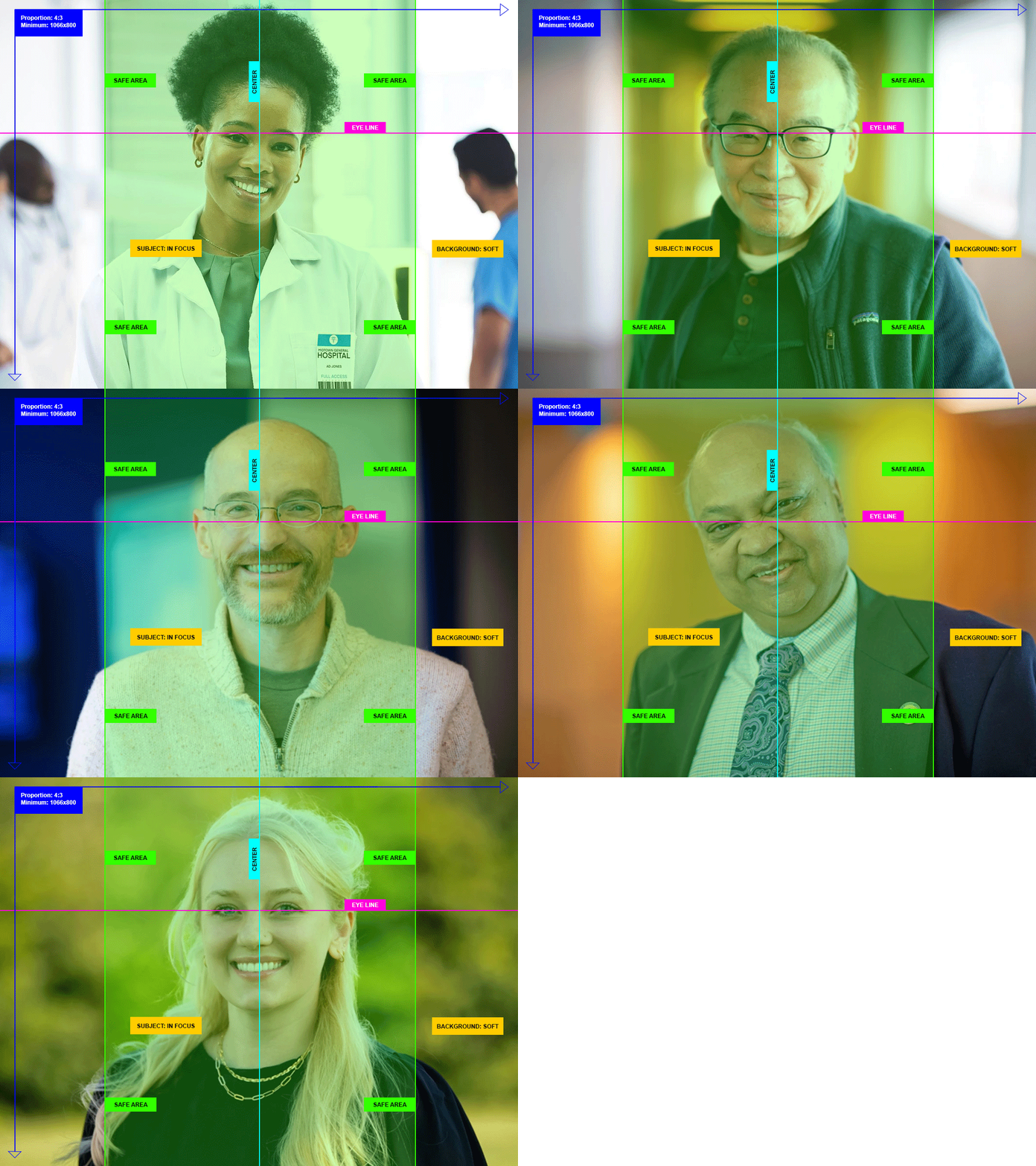
Staff photo specifications
- proportion: 4:3
- minimum size: 1066x800px
- subject should be positioned within the illustrated safe area in the center
- subject must be in focus
- subject's eye line should be close to the illustrated example
- background preferably in soft focus
Staff photo downloads
University Marketing can prepare your staff profile image. Below you will find templates to place your image if you'd like to prepare your photo yourself. Be sure to include the original, untouched photo with your submission in the event adjustments are needed.
Photo submissions that cannot be accepted
/filters:quality(80)/prod01/production-cdn-pxl/media/umassdartmouth/university-marketing/photo-video/staffphoto-bad-example-portrait.jpg?text=512+WebP)
/filters:quality(80)/prod01/production-cdn-pxl/media/umassdartmouth/university-marketing/photo-video/staffphoto-bad-example-compressed.jpg?text=512+WebP)
/filters:quality(80)/prod01/production-cdn-pxl/media/umassdartmouth/university-marketing/photo-video/staffphoto-bad-example-crop.jpg?text=512+WebP)
/filters:quality(80)/prod01/production-cdn-pxl/media/umassdartmouth/university-marketing/photo-video/staffphoto-bad-example-ai-filter.jpg?text=512+WebP)
- vertical portraits
- low quality or undersized images
- images that are cropped in close
- illustrations of AI filters
/filters:quality(90)/prod01/production-cdn-pxl/media/umassdartmouth/university-marketing/photo-video/staffphoto-bad-example-portrait.jpg)
/filters:quality(90)/prod01/production-cdn-pxl/media/umassdartmouth/university-marketing/photo-video/staffphoto-bad-example-compressed.jpg)
/filters:quality(90)/prod01/production-cdn-pxl/media/umassdartmouth/university-marketing/photo-video/staffphoto-bad-example-crop.jpg)
/filters:quality(90)/prod01/production-cdn-pxl/media/umassdartmouth/university-marketing/photo-video/staffphoto-bad-example-ai-filter.jpg)