IT Learning Spaces
Technology-enabled classrooms
IT classrooms are equipped with state-of-the-art projection systems offering audio and video capabilities to support teaching and learning. Teaching with technology can engage students at all levels and enhance their learning experience in and out of the classroom. Use the Crestron touch panel to manage inputs, including HDMI-connected laptops, AirMedia, document cameras, and audio. Many classrooms are also equipped with microphones, video cameras, and Echo360 for lecture capture.
IT Computer Classrooms and Labs
These labs are teaching spaces for faculty who are using computer technology in their coursework, and are equipped with computers (for hands-on student use) and projection systems.
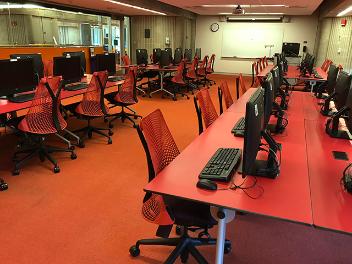
When not being used for teaching, the classrooms serve as public access computer labs for students, faculty, and staff.
Public Access Computer Labs are available during open hours in the Library. Visit the Library Calendar for the current schedule. Computer labs are located in the Claire T. Carney Library:
- 1st Floor Learning Commons
- LIB-128 Computer Lab
- 2nd Floor Scholarly Commons
Printing Services
Need to print, copy or scan to UMassD email? View printing instructions and policies for university-owned computers.
Information for faculty
Faculty and instructors may reserve a computer classroom during class time. Reservations are made via 25Live. Reservations are available for a single session or for the entire semester. Facilities are limited, so booking early is recommended.
The computer classrooms are equipped with CITS supported software. For additional software requests, submit an IT Support request.